09 Aug 2026 · 91Leads CRM
Integration of Google Forms with CRM: Automatically Capture Leads Without Manual Data Entry
Learn how Google Forms CRM Integration automatically captures leads, eliminates manual data entry, assigns enquiries to your sales team, and ensures faster follow-ups. Discover how integrating Google Forms with a CRM helps businesses improve lead management, increase productivity, reduce missed opportunities, and convert more enquiries into customers through automation.
Leads… Leads… Leads….Every business wants more and more leads, but does collecting leads meet the requirement? No, it is only half the battle you won.
The real challenge starts after a visit your google form and clicks on "Submit".
Many businesses are using Google Forms for storing leads / enquiries because it's free, easy to create, and works seamlessly across websites, landing pages, WhatsApp, QR codes, email campaigns, and social media.
Google Forms makes lead collection simple. It doesn’t matter what business you are doing. Might be you're a real estate developer collecting property enquiries, a school / college accepting admission requests, or a healthcare provider booking appointments,
But what when your enquiry volumes grow? Does Google Forms is sufficient to manage leads effectively?
Answer is No. When volume increases, Google Forms alone isn't enough to manage leads effectively.
Let’s consider one scenario
Imagine you are running real estate business and receives 100 enquiries in a day. Now, the work has to be assigned to someone from team to open Google Sheets, check and review new submissions, copy customer details into a CRM or spreadsheet, assign the enquiry to a salesperson, and remember to follow up. Due to this manual process, valuable time of resources gets wasted and the chances of delayed responses increases, due to human involvement chance of duplicate entries, wrong entries and missed opportunities increases.
To address all these problems smoothly, Google Forms CRM Integration becomes essential.
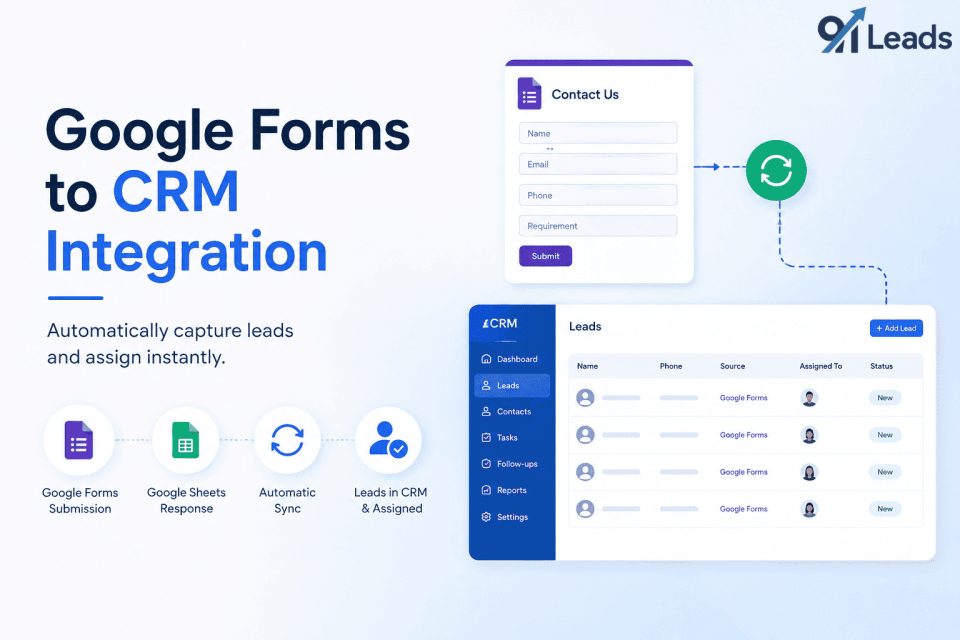
With integration, instead of manually transferring leads from Google Forms to CRM, leads can be automatically captured inside your CRM. Leads are assigned to the right sales executive instantly and real-time notifications are sent immediately, follow-up tasks are also created automatically, and tracking of every customer interaction starts from the customer submits the form.
Due to Integration of Forms with CRM, sales process gets faster, timely follow-ups can be done, and productivity of teams become much better, and conversion rates of leads to client increases.
Why Google Forms Is Popular for Lead Collection
As Google Forms is simple, flexible, and free, it has become one of the most widely used lead collection tools. To create google forms, you don’t need technical expertise, which makes it an ideal choice for all businesses.
Some common uses of Google Forms include:
-
Contact Us forms
-
Product demo requests
-
Property enquiries
-
Admission applications
-
Appointment bookings
-
Customer feedback
-
Event registrations
-
Franchise enquiries
-
Dealer registrations
-
Service requests
When any customer visits the forms and submits their enquiry, responses are automatically stored in Google Sheets, making it easy to collect and organize customer information.
For businesses such as startups, small and medium, where initially leads volume is less, this googles forms setup works well. But as lead volume keeps on increasing, it becomes difficult for the businesses to manage the enquiries efficiently and quickly through spreadsheets.
Do you think Google Sheet has been designed for lead Management? Why Google Sheets Isn't able to manage the leads alone?
The answer is simply No. Googel sheet has not been designed for the lead managements. It has been designed to capture information’s / data’s for storing data. It has been not built to manage a sales pipeline.
A Google spreadsheet is to get details that a customer has submitted a form. It cannot answer following important business questions such as:
-
Who is responsible for this lead?
-
Has anyone contacted the customer?
-
When is the next follow-up scheduled?
-
How many follow-ups have already been completed?
-
Which marketing campaign generated this enquiry?
-
What is the current status of the lead?
-
Why was the opportunity lost?
If businesses are not using CRM, thy are unable to answer the above questions which results a lots of struggle to maintain consistency in their sales process.
As leads increase, it’s become difficult to manage the spreadsheets, especially when multiple employees start accessing the same sheet for the same data. This sometimes results in duplicate entries, missed follow-ups, and create confusion over lead ownership.
A CRM, on the other hand, has been specifically designed to manage all the leads. It ensures customer relationships from the first enquiry to the final sale and even after sale.
-
Hidden Cost of Manual Lead Entry
Businesses in process of saving money, they start neglecting the impact of manual lead management. To save few, they forget to calculate that they are loosing huge.
Example:
A sales person starts copying information from Google Forms into a CRM, which may take only a minute or two per enquiry. Let’s consider it takes only one minute. For entering the 100 leads manually, sales person wastes it’s 100 minutes. If he used that 100 minutes to talk to the customer, he might have converted only 1 customer which will benefits more than the CRM monthly cost. So, businesses should start thinking the cumulative effect which is significant. Other losses due to manual entries
-
Delayed Customer Response
When any existing client approach for any issues, or new customer they expect quick responses.
If your team keeps on checking Google Sheets for the lead’s status, only a few times a day, there are chances that new enquiries may remain unattended for hours. In industries where competition is high such as real estate, education, healthcare, or automobile sales, delayed responses often result in lost business.
“Respond First. Engage Better”
The business which responds first, usually has a stronger opportunity to engage the customer.
-
Increased Administrative Work
The team members should spend time in understanding customer needs, scheduling meetings, and closing deals. Their valuable time should not be wasted in entering data into spreadsheets.
Due to manual tasks, productivity of teams reduces. It also limits the number of customers team can engage each day.
-
Human Errors
Due to manual tasks, typing mistakes happen.
If erroneously, there is mistakes in typing phone numbers, email addresses, duplicate records, and missing customer information can all affect the quality of sales process.
If all these process gets automated, it significantly reduces these risks by transferring information directly from Google Forms into the CRM.
-
Lack of Accountability
If lead management system is not structured, there is chance that multiple employees may contact the same customer while other enquiries remain untouched.
With integration of CRM, leads are clearly distributed among the teams, and it clearly establishes ownership for every lead, ensuring accountability across the team.
-
Limited Visibility for Admin
Every business, senior officials, Admin, need real-time insights to make correct and informed decisions.
Some questions become difficult to answer when data is scattered across spreadsheets:
-
Which salesperson has the highest conversion rate?
-
Which lead source delivers the best quality enquiries?
-
How many leads are pending follow-up?
-
Which opportunities are close to closing?
-
Which leads has been sent quotation?
-
Which leads are converted?
A CRM has answer to all these questions because they provide dashboards and reports that make these insights available instantly.
What is Integration of Google Forms with CRM means?
Integration of CRM with Google Forms means the process of automatically sending every Google Forms submission into a Customer Relationship Management (CRM) system.
With the integration, customer enquiries entered into Google Sheets, the information is instantly converted into a lead inside the CRM.
Once the leads enter into CRM, businesses can automate several tasks, including:
-
Lead creation
-
Sales pipeline updates
-
Customer communication tracking
-
Performance reporting
Above mentioned process in CRM helps to eliminates the repetitive manual work and ensures that every lead receives prompt attention.
With the help CRM integration, Google Forms transforms from a simple data collection tool into the starting point of an organized sales workflow.
Some of the Key Benefits of Integrating Google Forms with CRM are given below
-
Improved Lead Management
-
Better Team Productivity
-
Accurate Customer Data
-
Scalable Sales Operations
How Google Forms CRM Integration Works
Once Google Forms integrated with CRM, every lead follows a defined and structured workflow instead of being managed manually. This ensures that no lead is overlooked and every potential customer receives timely attention.
Let's understand the process step by step.
-
Step 1: A Customer Submits a Google Form
-
Step 2: The Lead Is Automatically Captured
-
Step 3: The CRM Checks Lead Assignment Rules
-
Step 4: Instant Notifications
-
Step 5: Follow-up Activities Are Created
-
Step 6: Every Interaction Is Recorded
Why Automation Is Better Than Manual Lead Management
Many businesses still believe that manual lead management is sufficient and profitable. Imagine leads coming from:
-
Google Ads
-
Google Forms
-
Website Contact Form
-
IndiaMART
-
Justdial
-
Referrals
As your business keeps on growing, number of leads increases and it becomes difficult to manage all these leads manually. So there is need of automation.
-
Automation provides consistency.
-
Every lead follows the same process.
-
Nothing is forgotten.
-
Nothing depends on memory.
-
Nothing depends on spreadsheets.
How 91Leads Simplifies Google Forms Lead Management
-
It helps to capture leads received through Google Forms into CRM and give you real time access.
-
It allows businesses to define lead distribution rules instead of using Google Sheets for lead management system,
-
It stores everything in one centralized dashboard instead of checking different platforms separately.
-
It automatically creates reminders for pending activities.
-
It allows businesses to track every stage of the leads.
-
91Leads provides reports and real time dashboards that help businesses
Industries that Benefit from Google Forms CRM Integration
Almost every business that generates leads or collect enquiries can benefit from automation such as
-
Real Estate
-
Education
-
Healthcare
-
Automobile
-
Insurance
-
Manufacturing
-
Travel and Tourism
Best Practices for Managing Google Forms Leads
Simply connecting Google Forms to a CRM isn't enough. Businesses should also follow proven lead management practices.
-
Respond Quickly
-
Assign Clear Ownership
-
Avoid confusion by defining lead assignment rules.
-
Standardize Your Forms
-
Keep your forms simple.
-
Collect only the information needed for the first conversation.
-
Long forms often reduce submission rates.
-
Track Every Interaction
-
Maintain records of calls, emails, WhatsApp conversations, and meetings to provide better customer service.
-
Monitor Lead Sources
Understanding where your best leads come from helps you invest your marketing budget more effectively.
Review Performance Regularly
Use CRM reports to evaluate response times, follow-up completion rates, and conversion performance.
Small improvements in these areas can lead to significant gains in overall sales efficiency.
Common Mistakes Businesses Make While Managing Google Forms Leads
Google Forms is an excellent tool for collecting customer information, but the way businesses manage those leads determines whether they convert into customers or become missed opportunities.
Many organizations invest heavily in marketing campaigns to generate enquiries but lose potential revenue because their lead management process is inefficient.
Here are some common mistakes businesses should avoid.
-
Checking Google Sheets Manually Throughout the Day
-
Delaying the First Follow-up
-
Managing Leads Through Multiple Spreadsheets
-
Not Assigning Lead Ownership
-
Focusing Only on Lead Quantity
-
Ignoring Lost Lead Analysis
A CRM helps to identify and record reasons for each lead status and identify improvement opportunities.
|
Manual Lead Management |
Google Forms CRM Automation |
|
Leads stored in spreadsheets |
Leads automatically stored in CRM |
|
Manual data entry |
Automatic lead creation |
|
Delayed notifications |
Instant notifications |
|
Manual lead assignment |
Automated lead assignment |
|
Difficult follow-up tracking |
Automated follow-up reminders |
|
Limited reporting |
Real-time dashboards and analytics |
|
High risk of missed leads |
Complete lead visibility |
|
Poor team coordination |
Sales transparency and collaboration |
|
Time-consuming lead updates |
Automatic record updates |
|
Duplicate lead entries |
Duplicate detection and prevention |
|
No centralized customer history |
Centralized customer database |
|
Inconsistent data quality |
Standardized data collection |
|
Manual status updates |
Automated lead status tracking |
|
Slow response to inquiries |
Instant lead alerts and faster response |
|
Limited scalability |
Easily scales with business growth |
|
Higher operational costs |
Reduced manual effort and lower costs |
|
Error-prone processes |
Improved accuracy through automation |
Myths Among Team Members
Myth: “Automation will remove Jobs”
Reality: CRM Automation does not reduce jobs and is not a replacement of any employee of the team. Rather, it is a tool that helps and empowers them.
Automation helps business to:
-
Focus on high-value activities like customer engagement and sales.
-
Respond to leads faster and more accurately.
-
Reduce manual errors and duplicate work.
-
Improve productivity and collaboration.
-
Deliver a better customer experience.
How Google Forms CRM Integration Improves Business ROI
Every business are spending a lot and wants better returns from its marketing investment.
Companies spend money on following to generate leads:
-
Google Ads
-
Facebook advertising
-
SEO
-
Website development
-
Landing pages
-
Lead generation campaigns
With the above they get the leads also. However, these generated leads are only valuable when these leads are managed properly.
Google Forms CRM integration improves ROI in several ways.
|
Business Benefits |
How CRM Automation Delivers It |
|
More Leads Converted into Customers |
Every enquiry is captured automatically and receives timely follow-up, improving response time and increasing lead conversion rates. |
|
Reduced Operational Costs |
Automates repetitive administrative tasks, reducing manual effort and allowing employees to focus on revenue-generating activities. |
|
Better Marketing Decisions |
Provides real-time reports and customer insights, helping businesses create targeted and data-driven marketing campaigns |
|
Improved Sales Productivity |
Automates lead assignment, reminders, and follow-ups, enabling sales teams to spend more time selling and less time on administrative tasks. |
|
Better Customer Experience |
Maintains complete customer history and ensures faster, personalized responses, leading to higher customer satisfaction and loyalty. |
Why Choose 91Leads for Google Forms Lead Management?
-
Collecting enquiries is easy.
-
Managing and converting those enquiries requires the right system.
-
91Leads helps businesses transform Google Forms submissions into organized sales opportunities by providing a complete lead management solution.
With 91Leads, businesses can:
-
Capture Leads Automatically
-
Every Google Forms enquiry can be converted into a lead without manual data entry.
-
Sales teams always have access to the latest customer information.
-
Manage Leads From Multiple Sources
-
Businesses rarely receive enquiries from only one channel.
-
91Leads helps bring leads together from multiple sources, including:
-
Google Forms
-
Website enquiries
-
Digital campaigns
-
Social platforms
-
Other marketing channels
This gives teams a complete view of their lead pipeline.
-
Automate Lead Distribution
Final Thoughts
Google Forms makes collecting customer enquiries simple, but collecting leads is only the beginning of the sales journey.
Without proper lead management, businesses risk losing valuable opportunities due to delayed responses, missed follow-ups, and unorganized customer data.
Integrating Google Forms with a CRM creates a smarter workflow where every enquiry is captured, assigned, tracked, and followed up systematically.
For businesses looking to improve sales efficiency, automation is no longer just a convenience, it is a competitive advantage.
With 91Leads CRM, companies can move beyond spreadsheets and manual processes to create a faster, more organized, and more effective lead management system.
By automating Google Forms lead capture, your sales team can spend less time managing data and more time converting enquiries into customers.
Turn every enquiry into an opportunity with smarter lead management.