Core of 91Leads CRM
Lead Management Software
Capture every enquiry, work it in list or pipeline view, and keep follow-ups honest. 91Leads is online lead management software built for small sales teams that need clarity without a heavy setup.
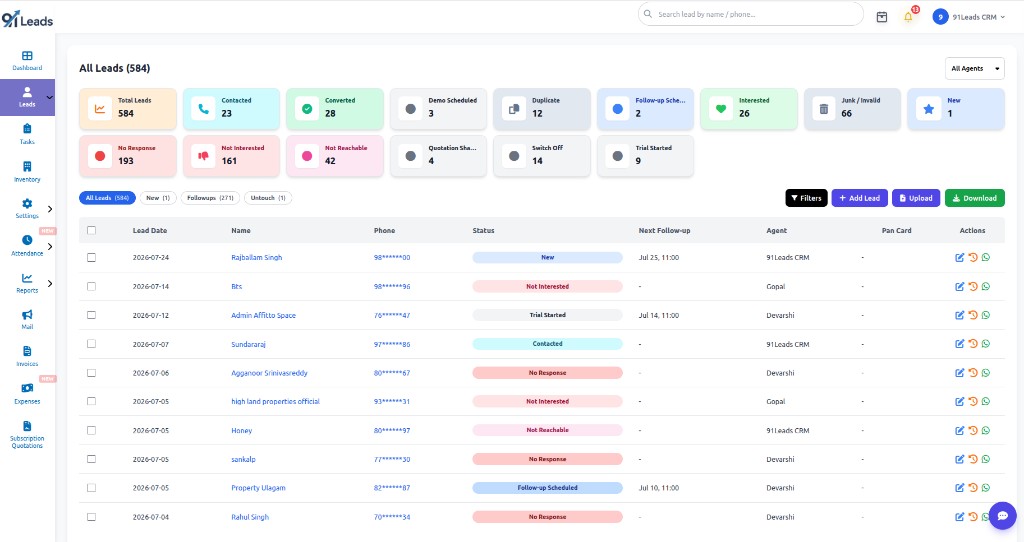
List view
Table of leads with status cards
Pipeline view
Kanban stages your team can drag
History
Track every conversation on a lead
Individual or bulk via Business API
A lead management system that matches how sales teams actually work
Most small businesses still park numbers in Excel or WhatsApp groups. By lunchtime, nobody is sure who called whom. 91Leads sales lead management software keeps status, agent, next follow-up, and notes on the same record so the next person picks up cleanly.
Two working views
Switch between a detailed list and a visual pipeline without losing filters or lead context.
Fast create flow
Add a lead in under a minute with the fields your team needs day to day, then open details when the call goes deeper.
Custom fields for everyone
Capture partner city, project interest, or any tag your process needs. Fields show on the lead for all users who can open that record.
Filter + pagination
Narrow by status, agent, source, dates, and more. Page through results at 10, 50, or 100 leads so big lists stay usable.
Excel / CSV upload
Bring existing sheets into the CRM when you migrate, then stop juggling files across laptops.
History you can trust
Open any lead and review status changes, feedback, follow-ups, and conversation trails before you dial again.
Way 1 · List view
Work leads in a clear table when you need every detail
List view is the everyday desk for lead tracking software. Status summary cards sit on top so you see counts for New, Contacted, Interested, Converted, Junk, and the rest at a glance. Below that, each row shows lead date, name, phone, status, next follow-up, and assigned agent.
- Quick tabs such as All Leads, New, Followups, and Untouch
- Row actions for edit, open details, and WhatsApp
- Colour status pills that match the cards above the table
- Checkboxes for admin bulk actions when you need them
If your team prefers scanning numbers and dates line by line, this is the view that feels familiar, without the mess of a shared spreadsheet.
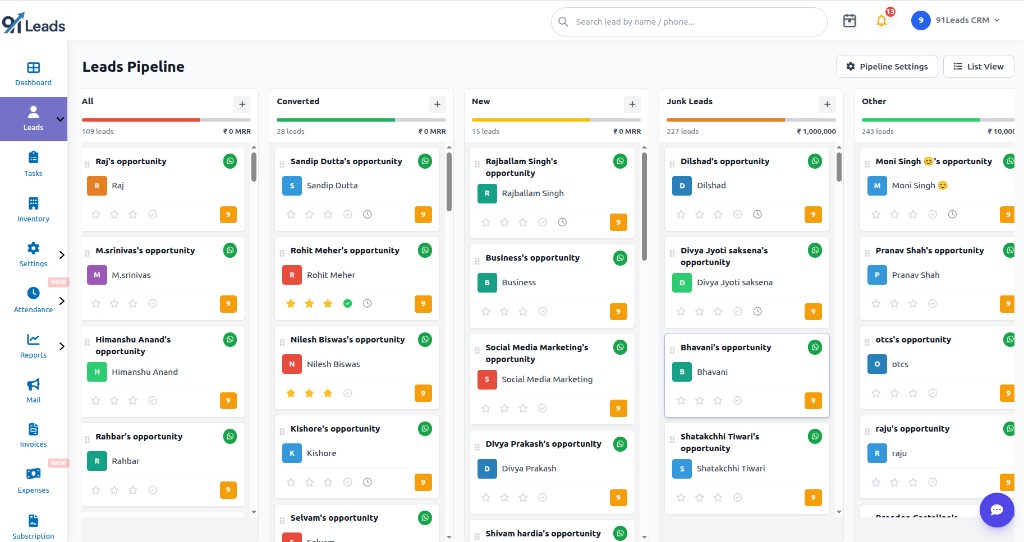
Way 2 · Pipeline view
Move deals across stages on a visual board
Pipeline view turns the same lead tracking system into columns by stage. Each column shows lead count and value so managers see where volume sits. Cards carry the lead name, WhatsApp shortcut, and quick signals for follow-up and activity.
- Drag leads between stages instead of hunting dropdowns
- Add a lead into a stage with the column + button
- Toggle back to List View whenever you need the full table
- Open Pipeline Settings when your stages need a tweak
Some mornings you want the board. Some evenings you want the list. Both views share the same leads, so you are not maintaining two systems.
Creating a lead stays deliberately simple
When a call comes in, nobody has time for a fifteen-field form. Hit + Add Lead, fill the basics, and save. You can enrich source, project, location, custom fields, and follow-up from the lead details page once the conversation has room to breathe.
Step 1
Open Add Lead
Start from list view, pipeline, or a stage column. Same create path, less hunting.
Step 2
Enter name & phone
Those two fields get the lead into the system so the enquiry is not lost on a notepad.
Step 3
Set status & agent
Assign ownership early so the next follow-up has a clear owner, not a shared pile.
Step 4
Save and continue
Open lead details later for history, custom fields, WhatsApp, and quick actions.
Built around your process
Custom fields that feel easy, available to all users
Every business asks something different on the first call. A coaching centre cares about batch. A realtor cares about budget and project. In 91Leads, custom fields sit right on the lead record under Basic Details, so your team does not invent side notes in WhatsApp.
Once configured, those fields are available for users who work leads, not locked behind a special “power user” screen. That keeps online lead management software honest: the same form, the same data, fewer “I thought you saved it” moments.
- Show fields like Partner city, Partner state, or Created from partner form
- See a custom field count in Quick Info on the lead details page
- Keep industry-specific data next to name, phone, source, and status
Lead information
Simple for every team member
Contact
Name & phone
Acquisition
Email & source
Progress
Status & lead type
Requirement
Location & project
Ownership
Assigned agent
Reminder
Next follow-up
Add your custom fields
Budget, batch, partner city, product interest, or anything your process needs.
Easy data movement
Upload in bulk, download whenever you need a copy
Moving off a spreadsheet should not mean retyping every row. Upload Excel or CSV at your convenience, map the file, and bring leads into the CRM. When you need an offline list for a meeting or an audit, download leads again from the same screen.
Bring data in
Bulk upload
Use the purple Upload action on the leads screen when you have a campaign dump, an older CRM export, or a partner list. Pick Excel or CSV based on what your team already exports. After import, those leads sit in the same list and pipeline as hand-entered ones.
- Faster onboarding for teams switching from sheets
- Useful for agency clients who still send weekly files
Take data out
Download leads
Hit Download when you need a snapshot for leadership, a vendor, or your own backup. You stay in control of when data leaves the CRM, instead of asking someone to “please mail the latest sheet.”
- Pull a fresh export after filtering the list
- Keep working inside 91Leads as the source of truth
The lead details page holds the full story
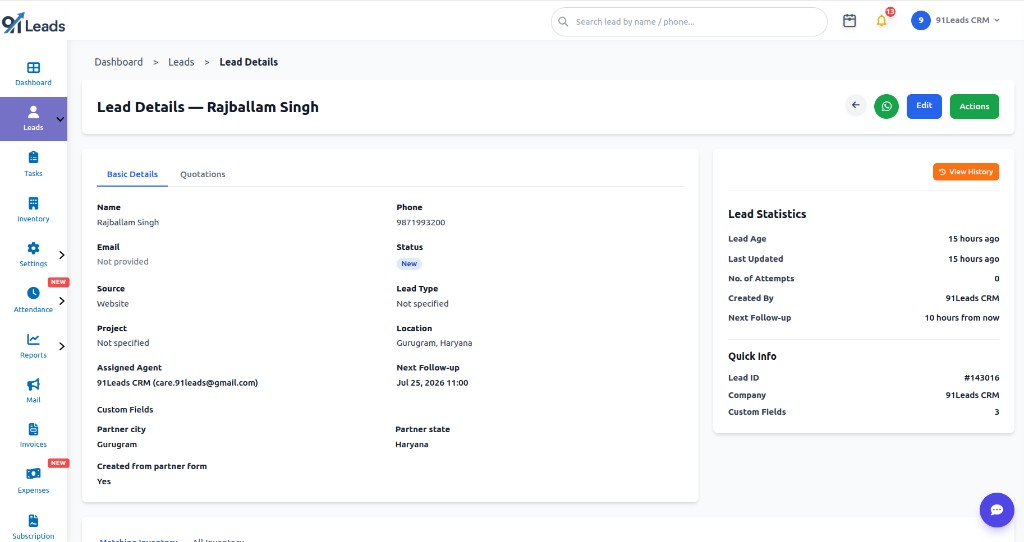
Opening a lead should feel like opening a case file, not starting from scratch. Basic Details shows name, phone, email, source, status, location, project, assigned agent, next follow-up, and your custom fields in one place.
- Statistics for lead age, last update, attempts, and created by
- Quick Info with Lead ID, company, and custom field count
- Edit when facts change; WhatsApp when you need to message now
- Tabs such as Quotations when commercial follow-ups begin
This is where a lead management system earns its keep: the next agent sees what already happened before they dial.
Watch history and update the lead without leaving the page
Hit View History to review conversation trails, status moves, and earlier notes. That is the difference between guessing and knowing why a lead went quiet.
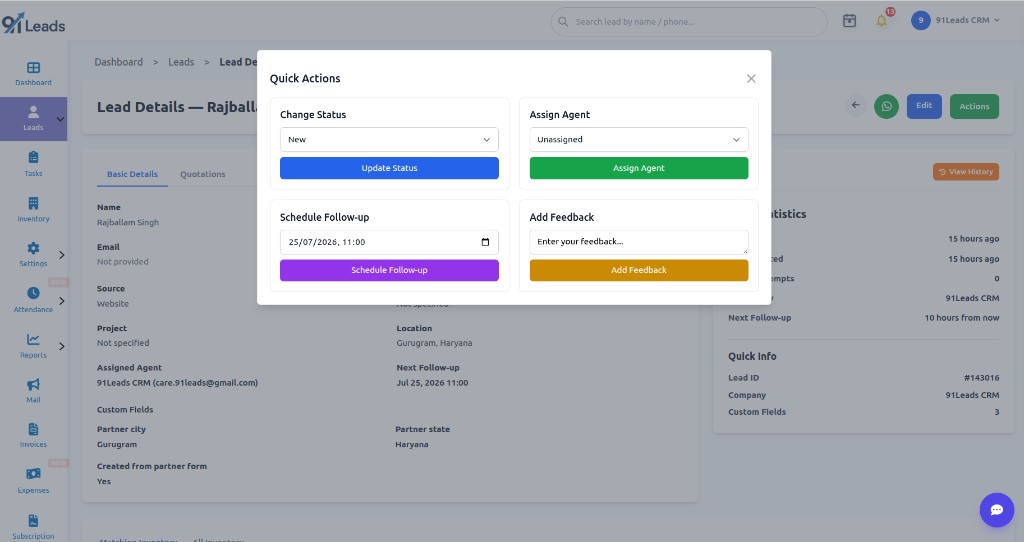
Quick Actions keep the common moves on one panel: change status, assign an agent, schedule the next follow-up, and add feedback after the call. Colour-coded buttons make the next step obvious when you are between dials.
- Update Status when the conversation shifts
- Assign Agent when ownership should move
- Schedule Follow-up so the reminder lands on the right day
- Add Feedback while the call is still fresh
Built into the leads panel
WhatsApp from the leads panel, one by one or in bulk
Most Indian sales conversations still start on WhatsApp. 91Leads keeps that path on the leads screen so agents do not copy-paste numbers into a personal chat all day.
Everyday use
Message individually
From list view, pipeline cards, or lead details, open WhatsApp for that one lead. Use it for a personal follow-up, brochure, or quick check-in without leaving the CRM.
- Green WhatsApp action on each lead row or card
- Same shortcut from the lead details header
- Fits day-to-day calling where every reply is different
With Business API
Bulk WhatsApp messaging
If WhatsApp Business API is connected, select multiple leads and send bulk template messages from the same panel. Reach the filtered set without typing each chat by hand.
- Bulk send from the leads panel after API setup
- Template-based outreach for offers, reminders, or updates
- Works with filters so you message the right slice
Individual WhatsApp stays useful every day. Bulk WhatsApp is there when your Business API integration is live and you need scale without leaving lead management software.
Admin-only controls
Admin privileges for bulk cleanup, assignment, and email
Agents need focus. Admins need levers. In list view, checkboxes let privileged users select many leads at once for the jobs that should never be done one row at a time.
Bulk delete leads
Test imports, junk dumps, and duplicate batches happen. Admins can select those leads and remove them in bulk instead of clicking delete fifty times.
Bulk lead assignment
When an agent leaves, a territory changes, or a campaign needs a fresh owner, admins can reassign selected leads in one go.
Bulk email
Select a filtered set and send one email to all of them. Use a saved template or write subject and body on the spot.
Who uses 91Leads Lead Management Software?
Founders, sales managers, and calling teams that need a practical lead management system: two views, simple create, custom fields, filters, history, and admin bulk tools, without a six-month CRM project.
Frequently Asked Questions
Common questions about Lead Management Software in 91Leads
Lead Management Software helps sales teams capture, organise, assign, follow up, and convert enquiries in one place instead of relying on WhatsApp chats and spreadsheets.
A lead management system stores every lead with status, source, agent, follow-up date, custom fields, and conversation history so handovers between teammates stay clear.
Yes. Use List View for a detailed table with status cards and filters, or switch to Pipeline View for a Kanban board by stage with drag-and-drop updates.
Yes. Upload Excel or CSV files to bring older lists into 91Leads, then continue tracking those leads with the same filters, history, and assignment tools.
Yes. Custom fields sit on the lead record so your team can capture business-specific details without asking for a custom development project.
Yes. Message a lead individually from list view, pipeline, or lead details. If WhatsApp Business API is connected, you can also send bulk WhatsApp template messages from the leads panel.
Admins can select multiple leads to delete in bulk, reassign them to another agent, or send bulk email with a template or custom message.
Yes. Start a 7-day free trial, add sample leads, try list and pipeline views, and explore filters, history, and assignment before you subscribe.
Run your pipeline with 91Leads Lead Management Software
Lead tracking software, list and pipeline views, custom fields, and admin bulk tools in one affordable CRM.